PhantomBuster is one of the best-known automation platforms for growth teams. It runs scraping and outreach “Phantoms” across LinkedIn, Instagram, X and more than a dozen other platforms, and for multi-step workflows it’s genuinely powerful.
But if you’re trying to build an email list from Twitter/X, you’ll quickly hit the catch: PhantomBuster’s X automations run on your own logged-in account, its Follower Collector can only reach the 70 most recent followers of any account, and its X profile exports don’t include an email field.
This guide compares TweetScraper vs PhantomBuster head to head - emails, audience size, account safety, pricing and setup - so you can see which one fits what you’re actually trying to do.
If you’re looking for a PhantomBuster alternative for Twitter specifically, or simply an alternative to PhantomBuster that returns emails instead of usernames, the short answer is below.
The short answer: pick TweetScraper if you want email lists from Twitter/X audiences - whole follower lists, likers, retweeters, repliers and more - without connecting your X account. Pick PhantomBuster if you need multi-step automation across many platforms, especially LinkedIn.
TweetScraper vs PhantomBuster at a glance
| TweetScraper | PhantomBuster | |
|---|---|---|
| What it is | Cloud email scraper built for Twitter/X | Automation platform for 15+ platforms |
| Returns emails from X audiences | Yes | No email field in its X profile exports |
| Followers per account | The full follower list - even millions | Up to the 70 most recent followers |
| Likers of a tweet | Any public tweet | Only tweets from your own account |
| Uses your X account | No | Yes - your logged-in session |
| Pricing model | Pay per email found; credits roll over | Execution hours, automation slots and credits |
| Starting price | 10 emails free, then $49/mo (1,000 emails) | $69/mo ($56/mo billed annually) |
| Free option | First 10 emails free, no credit card | 14-day trial, exports limited to 10 rows |
| Best for | Building email lists from X audiences | Multi-platform automation workflows |
PhantomBuster figures as of October 2026, from PhantomBuster’s pricing page and its help center.
 TweetScraper
- Emails from whole Twitter/X audiences, not just profiles
- Full follower lists - no 70-follower cap
- Likers, retweeters and repliers of any public tweet
- No risk of your X account getting suspended
- Only pay for emails found, never duplicates
- From $49/mo with 1,000 emails, plus 10 emails free
- Runs on your own logged-in X account
- Follower Collector capped at 70 recent followers
- No email field in X profile exports
- Execution hours run out and pause automations
- Automates many platforms in one place
What is PhantomBuster?
PhantomBuster is a cloud automation platform. Each “Phantom” is a single automation - collect followers, extract profiles, send messages - and “Workflows” chain several Phantoms together. It’s built for growth marketers, SDRs and agencies who want to automate prospecting across many platforms, with LinkedIn and Sales Navigator at the center.
How does PhantomBuster work on Twitter/X?
You connect your X account to PhantomBuster (through its browser extension, or by pasting your session cookie), pick a Phantom such as the Twitter Follower Collector or Twitter Profile Scraper, and it runs in the cloud using your logged-in session.
How much does PhantomBuster cost?
- Trial: 14 days, 2 hours of execution time, exports limited to 10 rows
- Start: $69/mo, or $56/mo billed annually - 20 hours of execution time, 5 automation slots
- Grow: $159/mo, or $128/mo billed annually - 80 hours, 15 automation slots
- Scale: $439/mo, or $352/mo billed annually - 300 hours, 50 automation slots
Plans also include monthly email, AI and URL-finder credits. When execution time runs out, automations pause until it resets or you upgrade. Prices may display in your local currency. See PhantomBuster pricing.
What is TweetScraper?
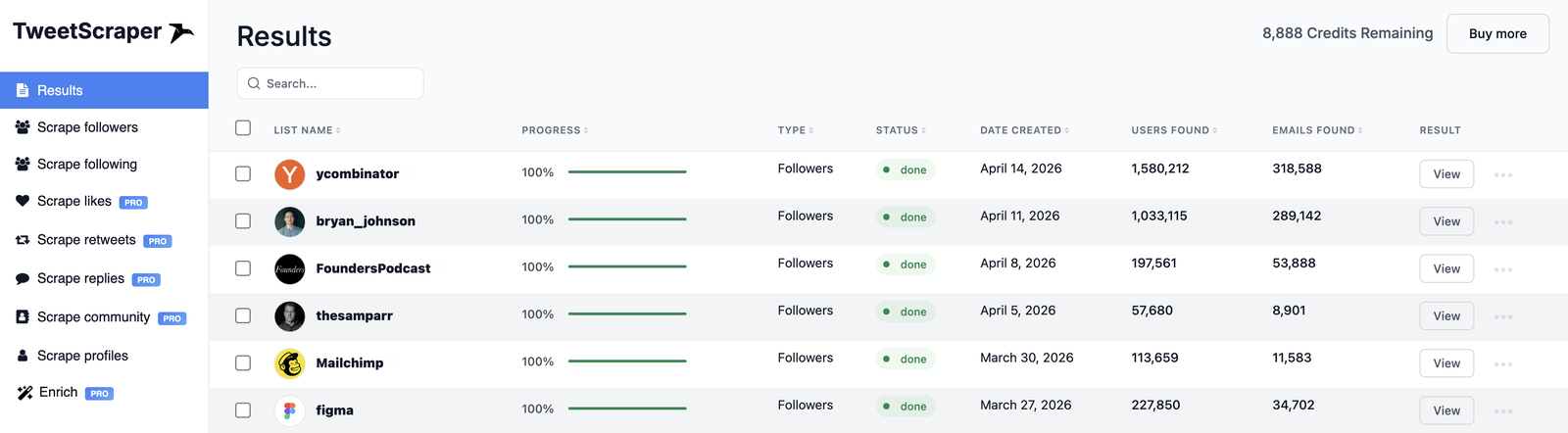
TweetScraper is a cloud email scraper built specifically for Twitter/X. You choose an audience - an account’s followers or following, the people who liked, retweeted or replied to a tweet, an X Community, a list, a keyword, or your own list of handles - and it returns the people in it with a contact email, ready to export as a CSV.
It returns emails, so you get contacts, not just usernames. And it never asks for your X login.
TweetScraper vs PhantomBuster: feature by feature
Emails: contacts vs usernames
This is the biggest difference. PhantomBuster’s Twitter Profile Scraper exports fields like name, handle, bio, location, website and follower counts - but no email field. You get profiles, not contacts.
TweetScraper is built to return emails, and your list only includes the people it found one for. Every row also carries the profile link, name, bio, website, location and follower count, so you can personalise your first line.
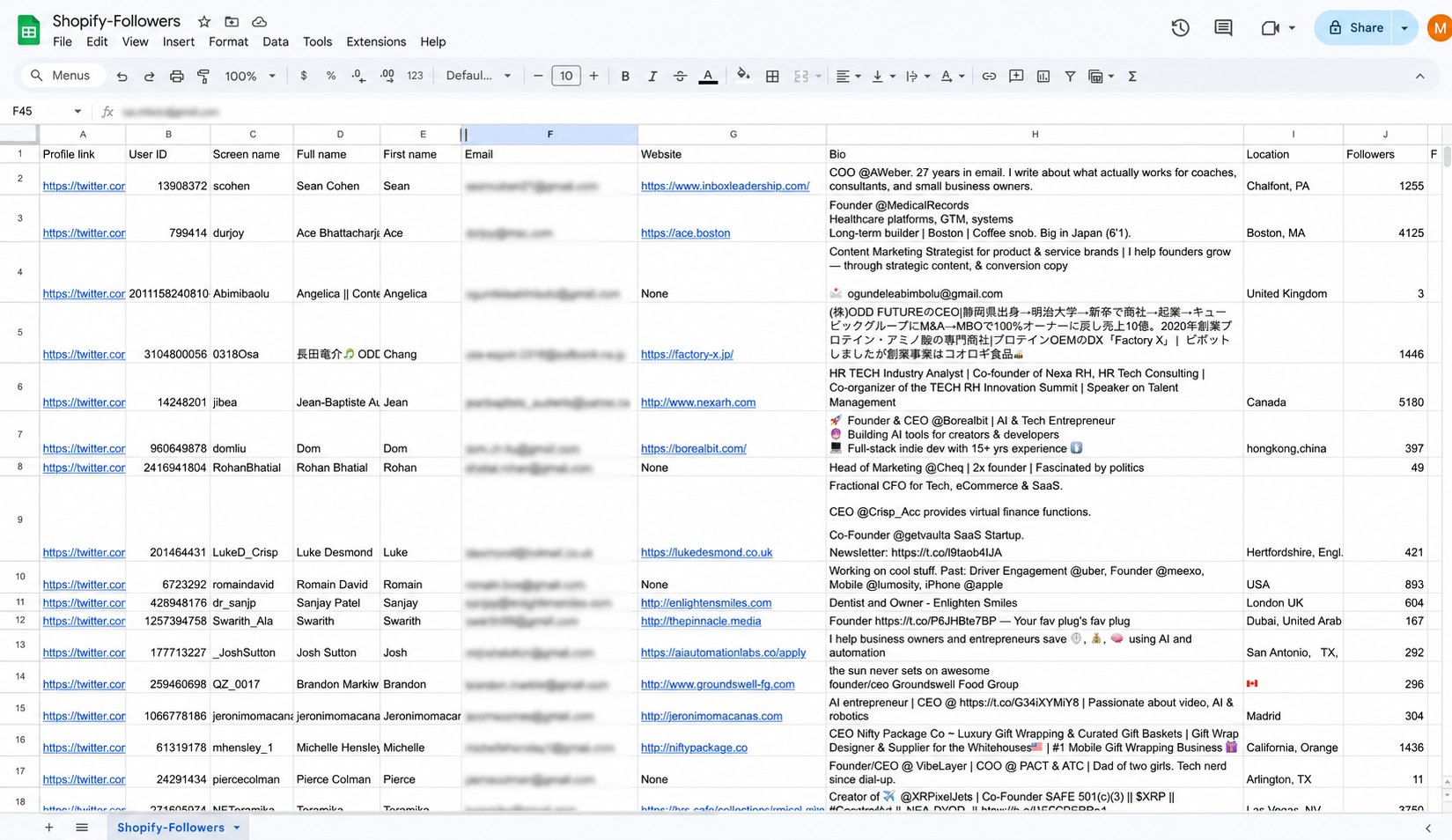
Winner: TweetScraper.
Audience size: 70 followers vs the whole list
According to PhantomBuster’s own Follower Collector page, it can extract up to the 70 most recent followers of an account - a limit set by X that applies even across multiple runs. For lead generation, 70 followers is a sample, not a list.
TweetScraper scrapes the full follower list, even for accounts with millions of followers.
- A hard cap set by X, even across runs
- Usernames and profile data, no email field
- Runs on your own logged-in session
- Full follower lists, even millions
- Emails from bios and linked websites
- Your X account is never involved
Winner: TweetScraper.
Where you can find leads
Both tools cover followers, following and profiles. Beyond that:
- Retweeters and repliers: TweetScraper scrapes both, so you can reach the people actively engaging with a topic you sell into.
- Communities and lists: TweetScraper scrapes X Community members and list members - often the most targeted audiences on the platform.
- Keyword search: TweetScraper finds people posting about a keyword right now.
Likers, retweeters, repliers and Community members are available on any TweetScraper paid plan.
Winner: TweetScraper for X audiences. PhantomBuster wins on platform breadth if you also need LinkedIn, Instagram and others in one tool.
Account safety
PhantomBuster runs its X automations through your own logged-in session. PhantomBuster says it uses usage patterns “designed to reduce account risk” - which is exactly the point: the risk sits with your account. X’s own developer guidelines warn that non-API automation, including scraping and browser automation, can lead to permanent suspension.
TweetScraper never connects to your X account, so there’s no risk of your X account getting suspended - no matter how much you scrape.
Winner: TweetScraper.
Pricing and value
The two tools charge for very different things:
- PhantomBuster charges for capacity: execution hours, automation slots and credits. A run that collects 70 followers still uses execution time, whether or not you get a single email out of it - and when your hours run out mid-month, your automations pause.
- TweetScraper charges per email found: 1 credit per email, never for duplicates or profiles without an email, and unused credits roll over to the next month.
| Plan | TweetScraper | PhantomBuster |
|---|---|---|
| Free | First 10 emails | 14-day trial, 10-row exports |
| Entry | $49/mo - 1,000 emails | $69/mo - 20 hours of execution time |
| Mid | $99/mo - 5,000 emails | $159/mo - 80 hours |
| Higher | $249/mo - 20,000 emails | $439/mo - 300 hours |
| Largest | Up to $999/mo - 250,000 emails | Scale ($439/mo) is the top plan |
At $49 for 1,000 emails, TweetScraper works out to about 5 cents per email, and you know exactly what you’re paying for before you start.
Winner: TweetScraper for email lists; PhantomBuster if you’re paying for multi-platform automation anyway.
Setup and ease of use
PhantomBuster has a learning curve: connecting accounts, configuring Phantoms, managing slots and schedules, and keeping your session cookie valid. That flexibility is its strength for automation-heavy teams.
TweetScraper takes about a minute: pick a source, paste a handle or tweet, optionally filter by keywords like Founder or CEO and choose business or personal emails, then start.
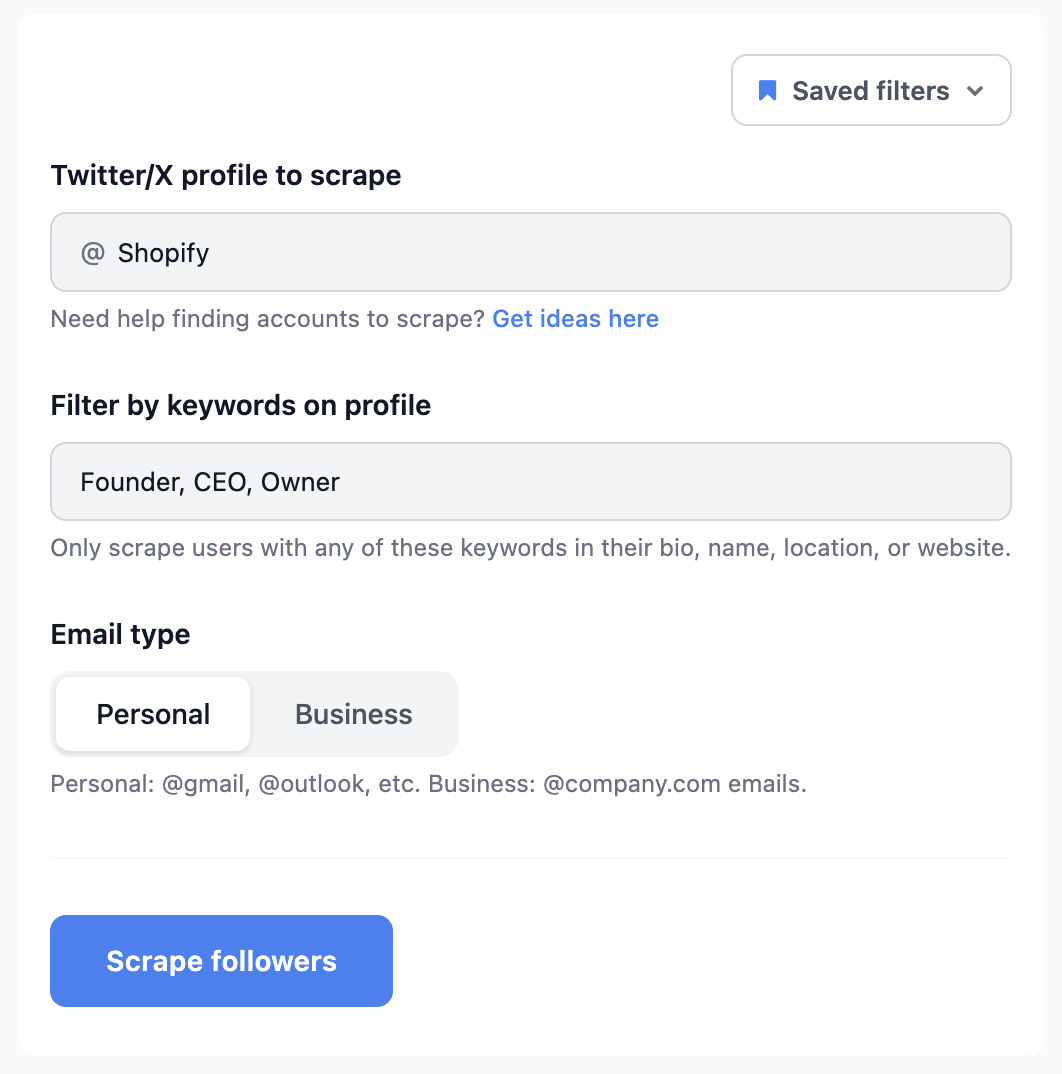
Winner: TweetScraper for speed to a usable list.
When PhantomBuster is still the right choice
PhantomBuster is still worth it if you automate multi-step workflows across several platforms - especially LinkedIn and Sales Navigator, where most of its automations live - and you’re comfortable managing session cookies and execution time. If your team already has workflows running on it, switching those has a real cost. For building email lists from Twitter/X audiences specifically, TweetScraper does the job without the 70-follower cap or the risk to your account, and many teams simply use both.
How to switch from PhantomBuster to TweetScraper
- Sign up free - your first 10 emails are on us, no credit card required.
- Pick the same audiences you were scraping in PhantomBuster: the accounts whose followers you collected, or the tweets whose engagers you wanted.
- Start the scrape and export a CSV with emails and profile data.
- Import it into Instantly, Smartlead, lemlist or your CRM.
For the full walkthrough, see how to scrape emails from Twitter. Comparing more tools? Our roundup of the best Twitter email scraper tools covers cloud tools, extensions and APIs side by side.
Final thoughts
PhantomBuster is a capable automation platform, and if you live in LinkedIn workflows it earns its place. But for Twitter/X lead generation it runs into hard limits: 70 followers per account, no emails in its X exports, and your account on the line.
If what you need is an email list from the people who follow, like and reply on X, TweetScraper gets you there in minutes - from the whole audience, without touching your account.
Start free with TweetScraper →
Frequently asked questions
Is TweetScraper a good PhantomBuster alternative?
For Twitter/X lead generation, yes. TweetScraper returns emails from whole X audiences - full follower lists, likers, retweeters, repliers, Communities and lists - without connecting your X account. PhantomBuster is the better fit only if you need multi-platform automation in one tool.
Can PhantomBuster scrape emails from Twitter?
Not directly. PhantomBuster’s Twitter Profile Scraper exports profile fields such as name, bio, location and website, but no email field. If you need emails from an X audience, TweetScraper returns them directly.
Why can PhantomBuster only export 70 Twitter followers?
According to PhantomBuster’s help center, X only exposes the 70 most recent followers of an account to its Follower Collector, and older followers can’t be collected even across multiple runs. TweetScraper isn’t subject to that cap and scrapes the full follower list.
Do I need to connect my X account to TweetScraper?
No. TweetScraper runs in the cloud and never asks for your X login, so there’s no risk of your X account getting suspended. PhantomBuster’s X automations run on your own logged-in session.
How much does TweetScraper cost compared to PhantomBuster?
TweetScraper starts at $49/mo for 1,000 emails, with your first 10 emails free, and you only pay for emails actually found. PhantomBuster starts at $69/mo ($56/mo billed annually) for 20 hours of execution time, which pays for running automations rather than for results.
Ready to build your first Twitter/X lead list? Scrape your first 10 emails free - no credit card, no X login.