
To scrape emails from Twitter (X), you point a Twitter email scraper at an audience - an account’s followers, the people who liked or replied to a post, a community or a list - let it read each public profile, and export the ones with a contact email into a CSV. With TweetScraper the whole thing takes a few minutes and returns a ready-to-send list - no X login, proxies, or code required.
This guide walks through the exact workflow, how to pick the right audience so your list actually converts, and what results to expect before you start.
What you need before you start
You only need three things:
- A target audience whose members match your ideal customer (more on choosing this below).
- A Twitter email scraper. We’ll use TweetScraper, but the steps are similar in most tools (see our comparison of the best Twitter email scraper tools).
- A place to send the results - a cold email tool like Instantly, Smartlead, or lemlist. TweetScraper exports a clean CSV that drops straight into any of them.
You do not need your own X account, a developer account, a proxy network, or any technical setup. Good scrapers run in the cloud and only read publicly visible data.
What to expect from a Twitter email scrape
Before you run your first scrape, it helps to set the right expectations.
Two things are worth knowing up front:
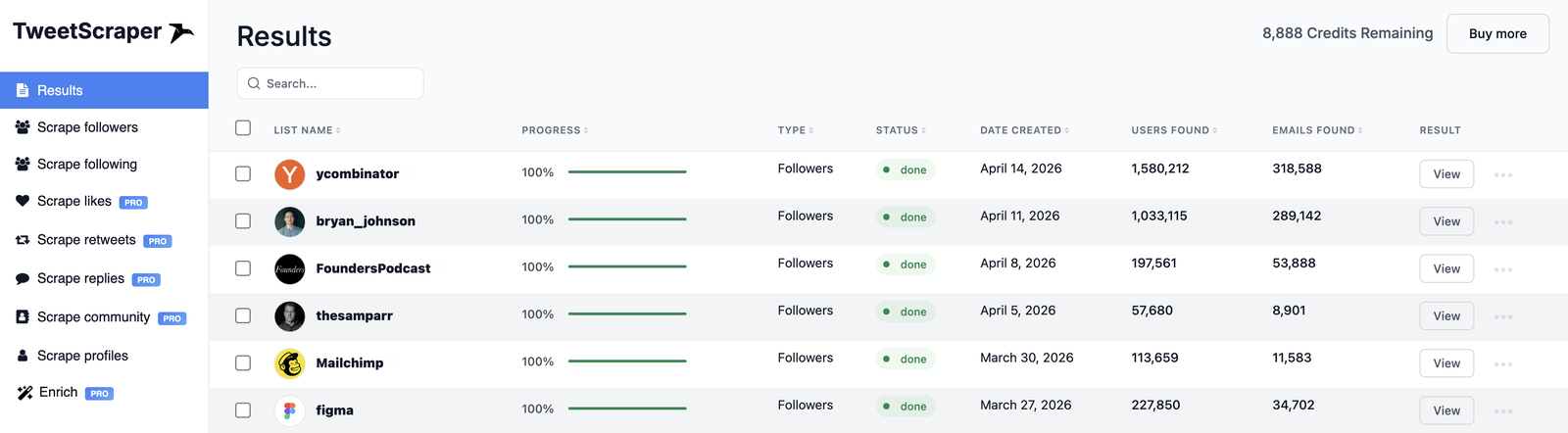
1. Not every profile will have an email. On X, the email find rate is usually around 10–15% of an audience, and 20–30% for the right, business-heavy audience. Here are some real follower scrapes:
2. You only pay for emails found. Credits are only used when an email is actually found, and you’re never charged for duplicates or for profiles without one.
The takeaway: the audience you choose determines the quality of your list far more than raw follower count. Pick the right target and the rest takes care of itself.
Where you can scrape emails from on X
Followers are the classic source, but X gives you several ways to find a high-intent audience:
- Followers of a competitor, a niche influencer, or a brand your buyers follow.
- Following - the accounts an influential person in your niche follows (often a curated list of operators and founders).
- Likers, retweeters and repliers of a specific post - people who just showed interest in a topic you sell into.
- Community members - everyone in an X Community about your niche.
- List members - curated X lists like “SaaS founders” or “DTC operators”.
- Keyword search - people posting about a topic right now.
- Your own list of handles - paste profiles you already have and get their emails.
Step-by-step: scrape emails from Twitter
Step 1 - Choose the right audience
This is the single biggest lever on list quality. The best target is an account whose followers are your customers - usually a competitor, a complementary product, or a niche creator your buyers follow.
For example, if you sell to startup founders, the followers of @ycombinator, @FoundersPodcast or @thesamparr are packed with founders and operators. If you sell to e-commerce brands, try @Shopify. Scraping a giant celebrity account will surface mostly consumers with no business email.
Aim for audiences made up of businesses, founders and operators, not the general public.
Step 2 - Start the scrape
In TweetScraper, choose the source (for example Scrape followers), paste the target handle, and start the run. You can pull the full audience - even from accounts with millions of followers.
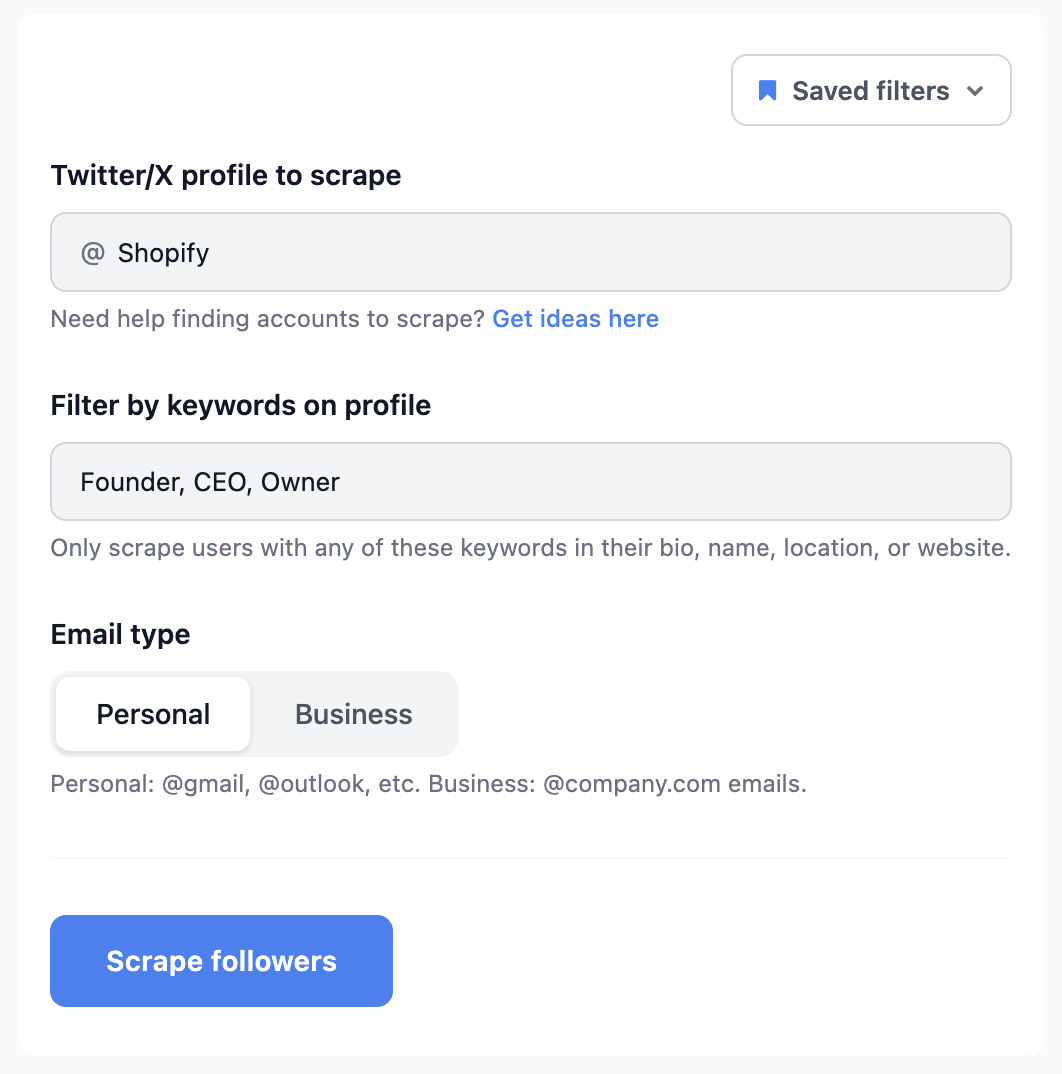
Two options make your list tighter before it’s even built:
- Filter by profile keywords. Only keep people with words like Founder, CEO, Owner or Agency in their bio, name, location or website.
- Choose the email type. Pick Business for @company.com addresses (best for B2B), or Personal for @gmail, @outlook and similar.
The scrape runs in the cloud and shows live progress as emails come in.
Step 3 - Narrow your list with filters (optional)
Before you start the run, TweetScraper’s filters shrink a huge audience down to just the people worth contacting - so you spend credits on the right profiles and get a cleaner list.
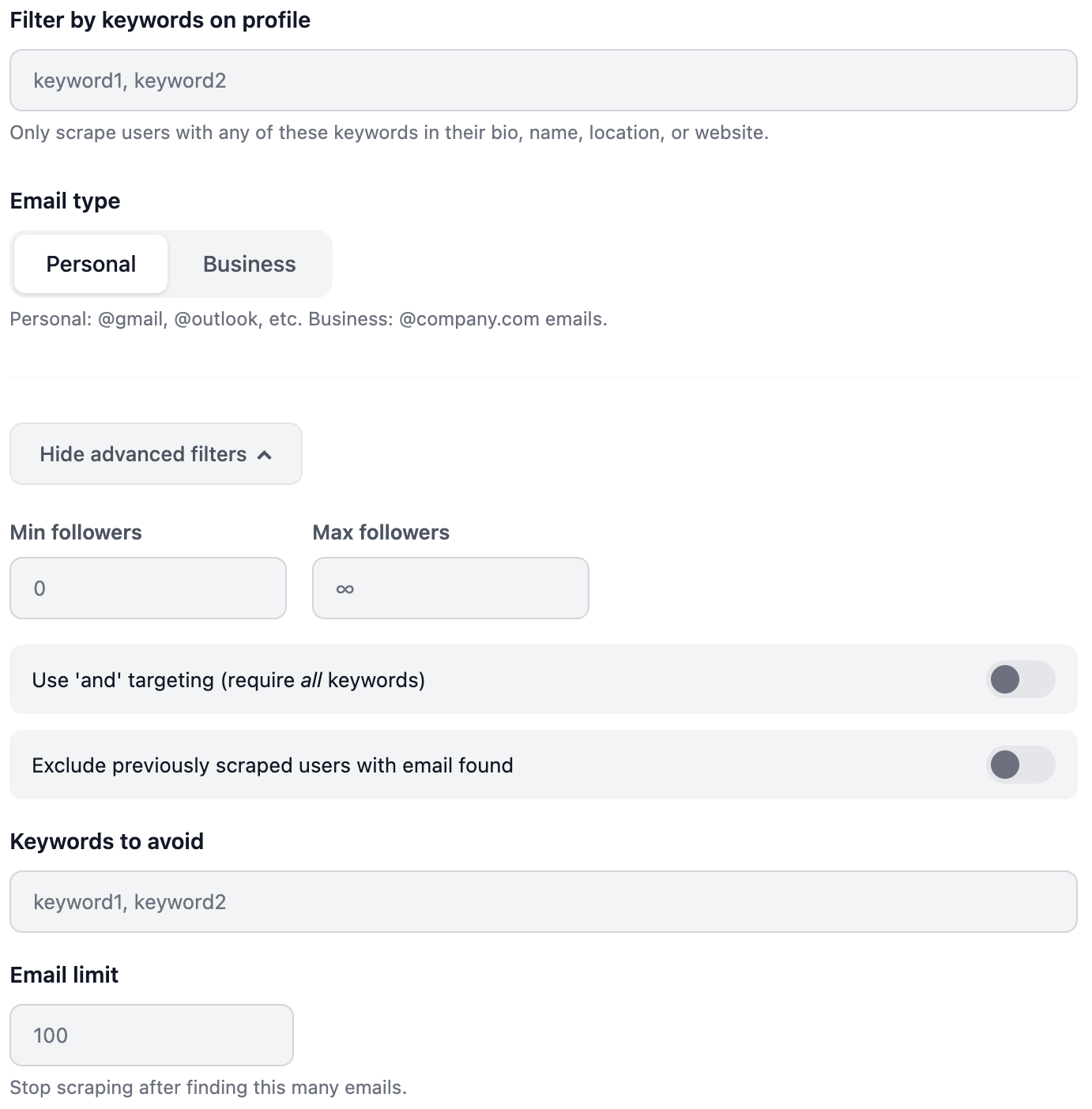
- Filter by keywords on profile. Only scrape people with any of your keywords in their bio, name, location or website - for example Founder, CEO, Agency or eCom.
- Email type. Choose Business for @company.com addresses (best for B2B) or Personal for @gmail, @outlook and similar.
- Min / Max followers. Target a follower range - handy for skipping giant accounts or filtering out inactive profiles.
- Use ‘and’ targeting. Require all of your keywords on a profile instead of any single one, for a much tighter match.
- Exclude previously scraped users. Skip anyone you’ve already scraped - whether or not an email was found - so lists from repeated runs never overlap.
- Keywords to avoid. Drop profiles that contain words you don’t want - a quick way to filter out students, job seekers or unrelated niches.
- Email limit. Stop the run once it’s found this many emails, so you can cap the size - and cost - of a scrape.
Step 4 - Export your CSV
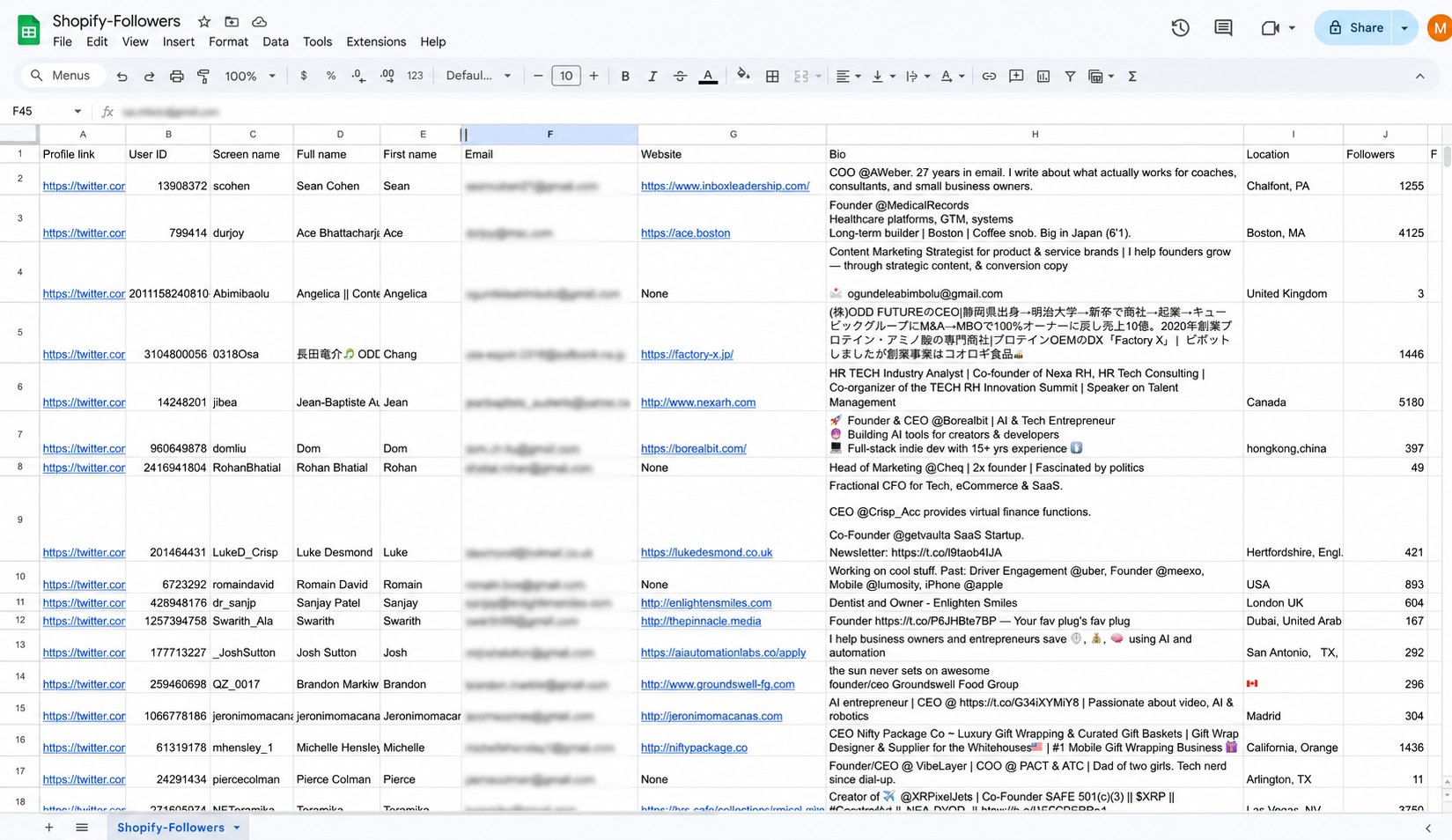
When the run finishes, export the results. The CSV includes the email plus profile data - profile link, username, full name, website, bio, location and follower count - which is gold for personalising your outreach later.
Step 5 - Load it into your cold email tool
Drop the CSV into Instantly, Smartlead, lemlist, or your CRM and start your sequence. Because you captured bio and website data alongside each email, you can write first lines that reference exactly who the person is and what they’re building.
The multi-audience strategy (how the pros get better lists)
Instead of scraping one giant account, experienced operators combine several focused audiences:
- Pick 3–5 mid-sized accounts (say 10k–200k followers) with a tightly focused, business-heavy audience.
- Add the likers and repliers of a few recent posts in your niche - they’re the most engaged people in it.
- Combine and de-duplicate the lists.
Smaller, niche audiences almost always have a higher email hit rate and better-fit leads than one broad mega-account.
Try the multi-audience strategy free
How to get more (and better) emails
- Prioritise founder and operator-heavy niches - SaaS, startups, agencies, e-commerce, creators and B2B tools all skew toward public contact emails.
- Scrape engagement, not just followers. People who like, retweet or reply to a relevant post are warmer than passive followers - and often convert better.
- Use profile keywords. A keyword filter like Founder, CEO, Owner trims the list to decision-makers before you spend a credit.
- De-duplicate when you combine lists from multiple runs, so nobody gets your email twice.
Is it legal to scrape emails from Twitter?
Yes. Collecting publicly available information is legal, and TweetScraper is built to operate strictly within the law.
Everything TweetScraper collects is information people have already made public. We never access private or protected accounts, never bypass logins or security measures, and never ask for your X credentials.
Compliance is built into the product, not bolted on:
- Public data only - if it isn’t publicly visible, it isn’t collected.
- GDPR and CCPA compliant - with a simple opt-out process for anyone who wants their information removed.
- Zero risk to your own account - you never connect your X account, so there’s no risk of your X account getting suspended.
Bottom line: you can build and use your lists with confidence. TweetScraper takes care of the compliance side so you can focus on your outreach.
For the emails you send, standard cold-email practice keeps you on the right side of the rules everywhere: say who you are, include a working unsubscribe link, and honour opt-outs. Our compliance page covers our approach in full.
Frequently asked questions
How many emails can I get from an account’s followers?
Typically around 10–15% of the audience, and 20–30% for the right, business-heavy account. So a 100,000-follower account usually yields somewhere between 10,000 and 15,000 emails. And because you’re only charged for the emails actually found, a lower-yield scrape simply costs you less.
Do I need an X account, developer access or proxies?
No. TweetScraper runs in the cloud and reads only public data, so you don’t connect your own X account, apply for API access, or set up proxies.
Can I get emails from people who liked or replied to a tweet?
Yes. Followers are just one source. You can also scrape the users who liked, retweeted or replied to a specific post, members of an X Community or list, people posting about a keyword, or your own list of handles - often producing warmer, higher-intent leads.
Can I get only business emails?
Yes. Choose Business as the email type to keep @company.com addresses, or Personal for @gmail, @outlook and similar. You can also filter by keywords in the profile, like Founder or CEO.
What can I do with the exported list?
More than cold email - the three most common plays are:
- Cold email. Import the CSV into a platform like Instantly, Smartlead, or lemlist and start a personalised sequence. The export includes bio and website data, so you can tailor your first line to each prospect.
- X DMs. Every export also includes the profiles that didn’t return an email - and you’re never charged credits for those - so you can reach that part of the audience directly with DMs.
- Paid ads. Upload the list to Meta, Google or X Ads as a custom audience, then build a lookalike audience so your ads reach people who closely resemble your ideal customers.
Ready to build your first list? Scrape your first 10 emails from any Twitter/X audience - no credit card required.