
To scrape emails from an X Community, you give TweetScraper the Community link (or ID), and it scrapes every member of the Community in real time and finds contact emails for them. You get the full member list - 14 data points for everyone (profile link, user ID, username, full name, first name, website, bio, location, followers, following, tweet count, profile picture link and the source it was scraped from), plus an email wherever one is found - as a ready-to-send CSV, and you only pay for the emails. It runs entirely in the cloud, never asks for your X login, and takes a few minutes with no code or proxies.
An X Community is a self-selected, topic-specific group: a “Build in Public” room, a SaaS-founders Community, a creator or crypto Community, a niche for designers or e-commerce operators. Every member deliberately joined that one subject. That makes Twitter Community members one of the most pre-qualified audiences on the platform - scrape a Community in your category and you reach people who literally raised their hand for your topic.
This guide covers why Communities convert so well, the exact steps to build the list, what lands in your export, and how Communities stack up against the other audiences you can scrape.
Why scrape an X Community?
An account’s followers show who is interested in a niche at scale. An X Community adds another layer: people opt in to a specific topic and stay because they care about it.
That self-selection is the whole advantage:
- Pre-qualified by topic. A member of a “SaaS founders” Community is, almost by definition, a SaaS founder or someone adjacent to one. The audience is filtered before you even start.
- Built around conversation. Communities are where people show up to post and read about one subject, so members tend to be engaged with it.
- Hard to reach any other way. These are often creators, SaaS founders and operators who aren’t sitting in a shared B2B database - a Community scrape gets you contacts most databases don’t have.
- A whole segment at once. Instead of guessing at job-title filters, you scrape an entire room of people already grouped around your exact niche.
Worth knowing: TweetScraper never connects to your X account, so there’s no risk to it no matter how many Communities you scrape.
How to scrape emails from an X Community with TweetScraper
The workflow is the same whether the Community has a few hundred members or tens of thousands.
Step 1 - Find the Community you want
Open the X Community in your browser and copy its link (or its ID from the URL). You can target any public Community in your niche - the one you run, one you’re a member of, or simply one your ideal customers hang out in.
Pick for fit, not size. A tightly focused Community of the right people will out-perform a broad one every time. If you sell project tools to agencies, a 2,000-member “agency owners” Community beats a 50,000-member general marketing room.
Step 2 - Paste it into TweetScraper
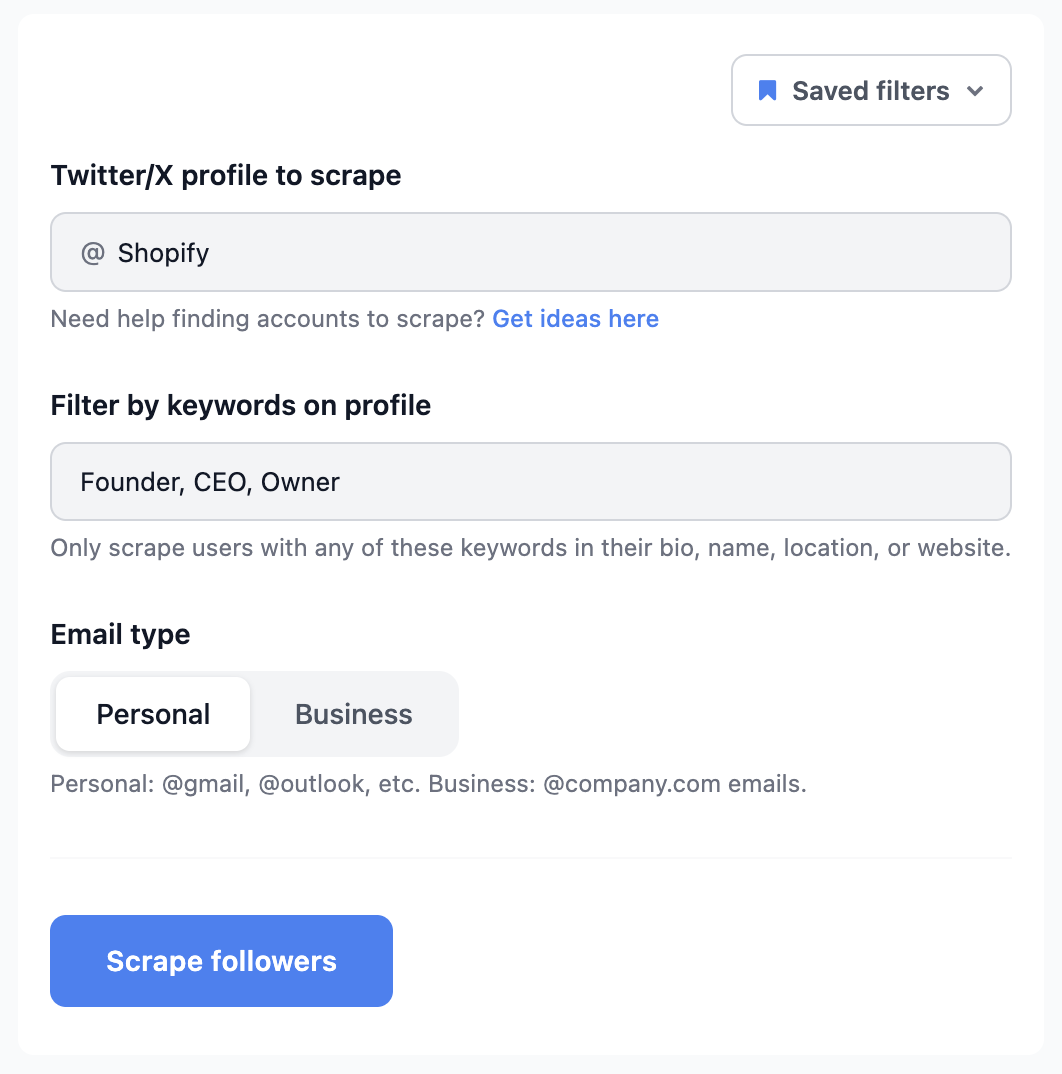
Choose the Community source, paste the link or ID, and set your options. You don’t need an X account, developer access or proxies - TweetScraper runs entirely in the cloud.
Step 3 - Filter before you spend a credit (optional)
Filters tighten the list before the run starts, so your credits go to the right members:
- Profile keywords. Keep only members with words like Founder, CEO, Agency or eCom in their bio, name, location or website.
- Email type. Choose Business for @company.com addresses (best for B2B) or Personal for @gmail, @outlook and similar.
- Follower range and exclusions. Skip accounts that are too big or too small, and exclude anyone you’ve already scraped so repeat runs never overlap.
Step 4 - Run it and export
Start the scrape and watch emails come in live. When it finishes, export the CSV. You’re only charged 1 credit per email actually found - never for duplicates, and never for members without an email.
Start free with TweetScraper →
What you get in the export
Every scrape returns a clean CSV - not just a column of addresses, but the profile context that makes outreach land.
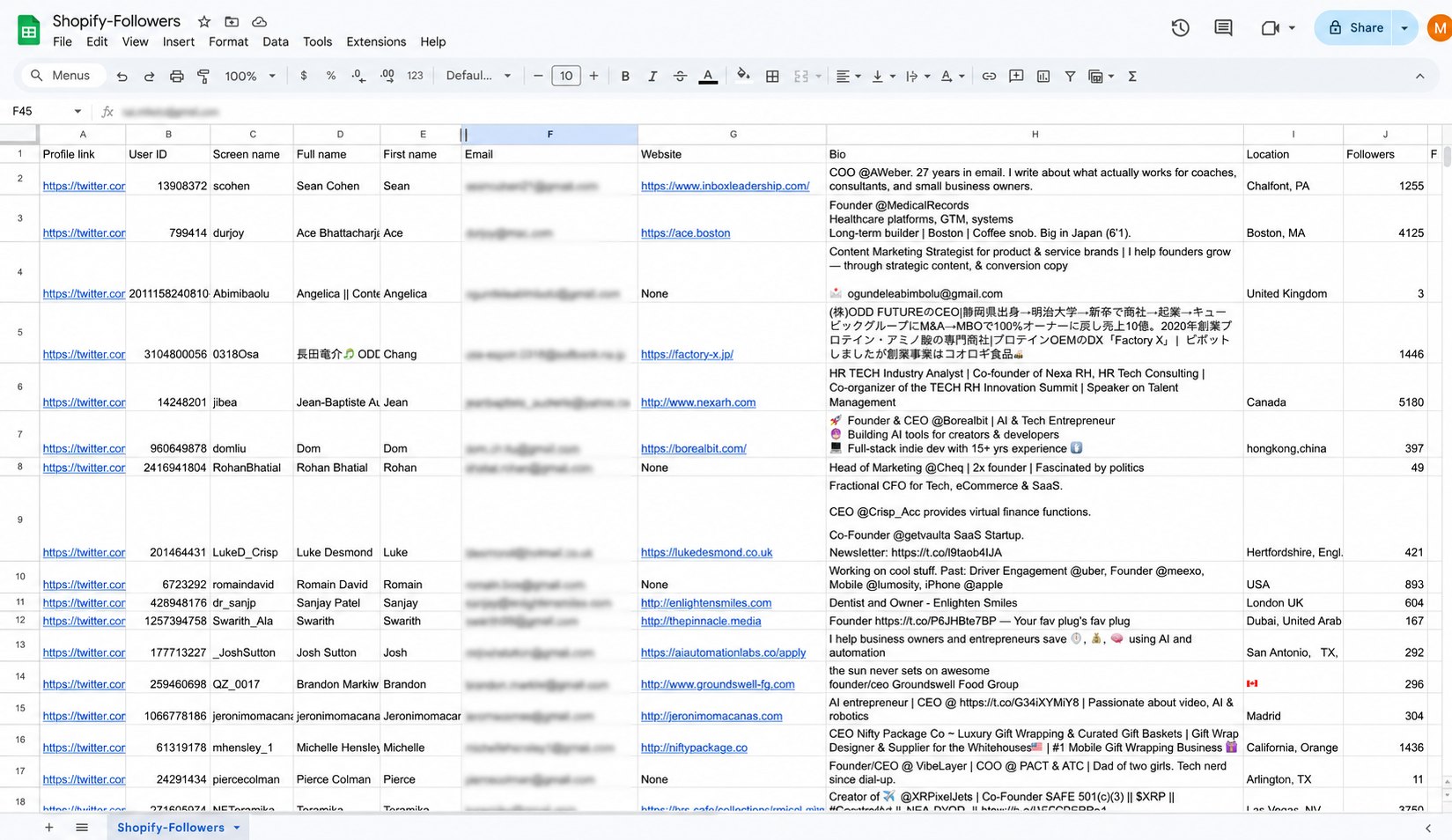
Every row includes 14 data points:
| Field | Why it matters |
|---|---|
| The contact address - what you’re paying a credit for | |
| Full name & first name | A ready-made first-name greeting, no splitting names by hand |
| Screen name (username) | Reference or mention them on X, and dedupe across runs |
| Profile link | One click to the member’s X profile before you send |
| User ID | X’s permanent account ID - stays the same even if they change their username, so it’s the safest key for your CRM |
| Bio | Reference what they actually do or are building in your first line |
| Website | Research the company before you send |
| Location | Segment by region or set send times |
| Followers | Prioritise or route higher-reach members |
| Following | Spot active networkers and gauge how engaged an account is |
| Tweets | See how active they are on X - frequent posters are easier to warm up |
| Profile picture link | Add a face to CRM records or personalised assets |
| Scraped from | Which Community (or other source) each row came from - handy when you combine several runs |
Because every row carries the member’s bio and site, you can write opening lines that reference exactly who the person is - which is the whole point of scraping a topic-specific Community rather than buying a generic list.
💡 Tip: Members without an email still appear in your run but cost you nothing. Keep those usernames - they’re the people to reach with an X DM instead.
What to do with the list
A Community export is ready to work the moment it lands:
- Cold email. Drop the CSV straight into Instantly, Smartlead, lemlist or your CRM and start a sequence. Use the bio and website fields to personalise, since everyone in the file already shares your topic.
- X DMs. The rows without an email are a free, warm DM list - people in the same Community as you, so a relevant message rarely feels cold.
- Paid ads. Upload the emails to Meta, Google or X Ads as a custom audience, then build a lookalike to reach more people like your Community members.
- Combine audiences. Merge several related Communities - or a Community plus the followers of a niche account - and de-duplicate for a broader, still-targeted list.
X Communities vs other TweetScraper audiences
Communities are one of several audiences you can scrape. They shine when you want a whole room of people who opted into a topic; other sources win for other goals.
| Audience | Best when you want | Learn more |
|---|---|---|
| X Community | A self-selected group that opted into one topic | You’re here |
| Followers | Everyone who follows a competitor or niche account | Scrape followers |
| Following | The operators and founders an influential account follows | Scrape following |
The quick rule: a Community is a group people joined, while a following list is a set of accounts one person chose - both are tightly focused on a single topic. For the full picture of every source, see how to scrape emails from Twitter, or compare tools in our best Twitter email scraper tools roundup.
Frequently asked questions
How many emails can I get from an X Community?
It depends on the Community - not every member will have an email, and a business-heavy, founder-led Community will yield more contactable addresses than a casual consumer one. Because you’re only charged for emails actually found, a smaller or lower-yield Community simply costs you less.
Do I need to be a member of the Community to scrape it?
No. You can scrape any public X Community - just paste its link or ID. You don’t need to join, and you never connect your own X account.
Does TweetScraper ask for my X login?
No. It runs in the cloud and never asks for your X credentials, so there’s zero risk to your account no matter how many Communities you scrape.
What does it cost to scrape a Community?
Pricing is 1 credit per email found - never for duplicates or profiles without an email. Plans start at $49/mo for 1,000 emails, your first 10 emails are free with no credit card, and unused credits roll over.
Can I scrape more than one Community at once?
Run each Community as its own scrape, then combine and de-duplicate the exports. Many operators merge a few related Communities - or a Community with the followers of a niche account - to build a larger list that’s still tightly on-topic.
Ready to turn a Community into a lead list? Scrape your first 10 emails free - no credit card, no X login.